Sorry, you need to enable JavaScript to visit this website.
Skip navigation
Home
    • CGM
        • Accu-Chek SmartGuide CGM solution
        • CGM Learning Centre
        • CGM Support
    • Products View all
        • Continuous Glucose Monitoring View all
            • Accu-Chek SmartGuide CGM solution (for people with diabetes)
        • Blood Glucose Monitoring View all
            • Meters View all
                • Accu-Chek Guide Me
                • Accu-Chek Guide Link
            • Test Strips View all
                • Accu-Chek Guide
                • Accu-Chek Instant
                • Accu-Chek Performa
                • Accu-Chek Mobile
            • Lancing Devices & Lancets View all
                • Accu-Chek FastClix
                • Accu-Chek FastClix lancets
                • Accu-Chek Softclix
                • Accu-Chek SoftClix lancets
                • Accu-Chek Safe-T-Pro Plus
        • Apps & Software View all
            • mySugr
    • Training & Support View all
        • CGM Learning Center View all
            • CGM Learning Center Library
            • Getting Started View all
                • What’s included with your Accu-Chek SmartGuide CGM solution
                • Download and set up the Accu-Chek SmartGuide app
                • Apply the Accu-Chek SmartGuide sensor
                • Pair the Accu-Chek SmartGuide sensor and app
                • Calibrate the Accu-Chek SmartGuide sensor
                • Download and set up the Accu-Chek SmartGuide Predict app
                • Remove and dispose of the sensor
            • How to use the Accu-Chek SmartGuide App View all
                • Explore the Accu-Chek SmartGuide app
                • Trend arrows and colors
                • How to use graphs and statistics in the Accu-Chek SmartGuide app
                • Data Sharing with the Accu-Chek SmartGuide app
                • How to use alarms and reminders in the Accu-Chek SmartGuide app
            • How to use the Accu-Chek SmartGuide Predict App View all
                • Explore the Accu-Chek SmartGuide Predict app
                • How to use the Glucose Predict feature
                • How to use the Low Glucose Predict feature
                • How to use the Night Low Predict feature
                • How the Glucose Patterns Feature works in the Accu-Chek SmartGuide Predict app
            • CGM Basics View all
                • CGM vs. BGM: Understanding the difference
                • What is MARD?
                • Lag time in Continuous Glucose Monitoring (CGM)
                • Understanding the Ambulatory Glucose Profile (AGP)
        • Product Support View all
            • Continuous Glucose Monitoring View all
                • Accu-Chek SmartGuide CGM solution
            • Meters and Strips View all
                • Accu-Chek Guide
                • Accu-Chek Guide Link
                • Accu-Chek Guide Me
                • Accu-Chek Instant S
                • Accu-Check Mobile
                • Accu-Chek Performa
            • Lancing Devices & Lancets View all
                • Accu-Chek FastClix
                • Accu-Chek Softclix
                • Accu-Chek Saf-T-Pro Plus
            • Insulin delivery system View all
                • Accu-Chek Combo
            • Infusion Sets View all
                • Accu-Chek Flexlink
                • Accu-Chek TenderLink
                • Accu-Chek Rapid-D Link
                • Accu-Chek LinkAssist
        • Tools & Resources View all
            • HbA1c Calculator
        • General FAQs
        • Software Support Request
        • Warranty Claim
    • Meter Registration
    • Shop
Home
  • CGM
    • Accu-Chek SmartGuide CGM solution
    • CGM Learning Centre
    • CGM Support
  • Products
    • Continuous Glucose Monitoring
      • Accu-Chek SmartGuide CGM solution (for people with diabetes)
    • Blood Glucose Monitoring
      • Meters
        • Accu-Chek Guide Me
        • Accu-Chek Guide Link
      • Test Strips
        • Accu-Chek Guide
        • Accu-Chek Instant
        • Accu-Chek Performa
        • Accu-Chek Mobile
      • Lancing Devices & Lancets
        • Accu-Chek FastClix
        • Accu-Chek FastClix lancets
        • Accu-Chek Softclix
        • Accu-Chek SoftClix lancets
        • Accu-Chek Safe-T-Pro Plus
    • Apps & Software
      • mySugr
  • Training & Support
    • CGM Learning Center
      • CGM Learning Center Library
      • Getting Started
        • What’s included with your Accu-Chek SmartGuide CGM solution
        • Download and set up the Accu-Chek SmartGuide app
        • Apply the Accu-Chek SmartGuide sensor
        • Pair the Accu-Chek SmartGuide sensor and app
        • Calibrate the Accu-Chek SmartGuide sensor
        • Download and set up the Accu-Chek SmartGuide Predict app
        • Remove and dispose of the sensor
      • How to use the Accu-Chek SmartGuide App
        • Explore the Accu-Chek SmartGuide app
        • Trend arrows and colors
        • How to use graphs and statistics in the Accu-Chek SmartGuide app
        • Data Sharing with the Accu-Chek SmartGuide app
        • How to use alarms and reminders in the Accu-Chek SmartGuide app
      • How to use the Accu-Chek SmartGuide Predict App
        • Explore the Accu-Chek SmartGuide Predict app
        • How to use the Glucose Predict feature
        • How to use the Low Glucose Predict feature
        • How to use the Night Low Predict feature
        • How the Glucose Patterns Feature works in the Accu-Chek SmartGuide Predict app
      • CGM Basics
        • CGM vs. BGM: Understanding the difference
        • What is MARD?
        • Lag time in Continuous Glucose Monitoring (CGM)
        • Understanding the Ambulatory Glucose Profile (AGP)
    • Product Support
      • Continuous Glucose Monitoring
        • Accu-Chek SmartGuide CGM solution
      • Meters and Strips
        • Accu-Chek Guide
        • Accu-Chek Guide Link
        • Accu-Chek Guide Me
        • Accu-Chek Instant S
        • Accu-Check Mobile
        • Accu-Chek Performa
      • Lancing Devices & Lancets
        • Accu-Chek FastClix
        • Accu-Chek Softclix
        • Accu-Chek Saf-T-Pro Plus
      • Insulin delivery system
        • Accu-Chek Combo
      • Infusion Sets
        • Accu-Chek Flexlink
        • Accu-Chek TenderLink
        • Accu-Chek Rapid-D Link
        • Accu-Chek LinkAssist
    • Tools & Resources
      • HbA1c Calculator
    • General FAQs
    • Software Support Request
    • Warranty Claim
  • Meter Registration
  • Shop

Breadcrumb

  1. Home
  2. E 6
  1. Home
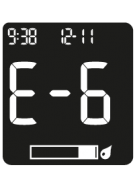
E-6

Accu-Chek Instant test strips

Error codes E-6

Blood or control solution was applied to the test strip before the flashing drop symbol appeared on the display.

Discard the test strip and repeat the blood glucose or control test.

Blank
Blank

The meter will not turn on or the display is blank.

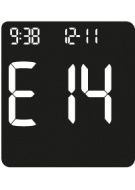
E-14
E-14

An electronic error has occurred.

E-13
E-13

Fluid or foreign material may be present in the test strip…

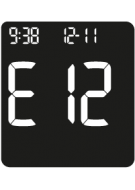
 E-12
E-12

Your blood sample may contain a high level of ascorbate.

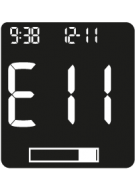
E-11
E-11

The test strip may be damaged.

E-10
E-10

The time and date setting may be incorrect.

E-8
E-8

The temperature is above or below the proper range for the…

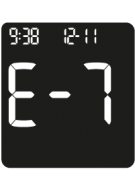
E-7
E-7

An electronic error occurred.

E-4
E-4

Not enough blood or control solution was drawn into the test…

E-3
E-3

A meter or test strip error has occurred.

E-1
E-1

The test strip may be damaged, not properly inserted, or was…

Battery
Battery

The batteries are almost out of power.

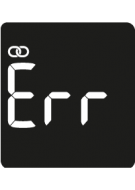
Err
Err

The meter was unable to pair with a mobile device.

USB
USB

The meter is connected to a PC, a blood glucose test cannot be…

Product Support

Get the most out of your Accu-Chek products with support and troubleshooting tips.

Accu-Chek Instant test strips

FAQs

Get in touch

Send us a message

We'll get back to you within 3 business days.

Email us
Give us a call

Phone:1800 434 121 (toll free)
Hours: 9:00am to 5:00pm AEST
Monday to Friday excluding public holidays

This is roche logo
AUSTRALIA
Learn More
  • All locations
  • Sitemap
Legal & Privacy
  • About
  • Cookie Policy
  • Privacy Policy
  • Your Privacy Choices
Contact
  • Contact Us
  • Terms of Sale
AUSTRALIA

WARNING – KEEP BATTERIES OUT OF REACH OF CHILDREN. If you suspect your child has swallowed or inserted a button battery immediately call the 24-hour Poisons Information Centre on 13 11 26 for fast, expert advice. FOR PEOPLE WITH DIABETES. ALWAYS READ THE LABEL AND FOLLOW THE DIRECTIONS FOR USE. 

This website contains information on products which are targeted to a wide range of audiences and could contain product details or information otherwise not accessible or valid in your country. Please be aware that we do not take any responsibility for accessing such information which may not comply with any valid legal process, regulation, registration or usage in the country of your origin.

© 2025 Roche. Roche Diabetes Care Pty Ltd. All rights reserved.

Login Modal